Customize, manage, and track your shipments
An important change for LTL freight customers
FedEx Freight became an independent less-than-truckload (LTL) company on June 1st. If you’re looking for LTL tracking, visit the new FedEx Freight page. If you’re an air freight or parcel customer, you can keep using this page for advanced tracking.
Track multiple shipments, run reports, and get access to documents and images in one convenient place—an easy-to-use, personalized tracking dashboard.
(Currently unavailable on mobile devices)

Manage multiple shipments with customized tracking, reports, and more
Setting up Advanced Tracking
Discover how Advanced Tracking offers one convenient place for monitoring all your shipments. See the steps to set it up. And get an overview of the features, including the customizable dashboard and reports.
Setting up Advanced Tracking
Discover how Advanced Tracking offers one convenient place for monitoring all your shipments. See the steps to set it up. And get an overview of the features, including the customizable dashboard and reports.
Customizing your tracking dashboard
Organize your tracking dashboard to monitor multiple accounts and packages with ease. Learn to create customized reports and shipping notifications for your recipients.
When you track through your customized tracking dashboard,
you can:
When you track through your customized tracking dashboard, you can:
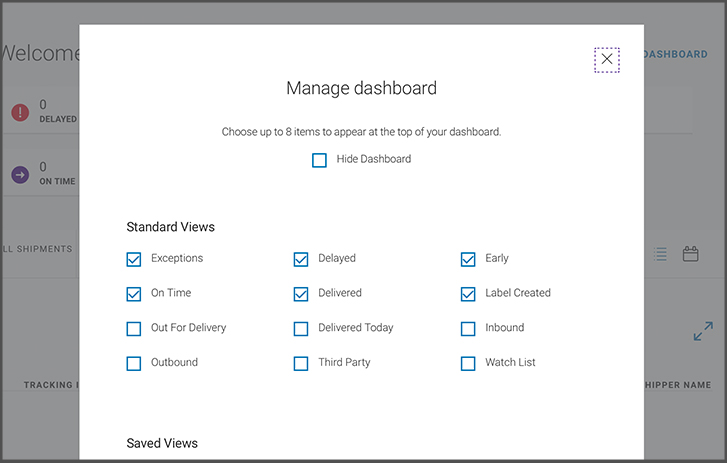
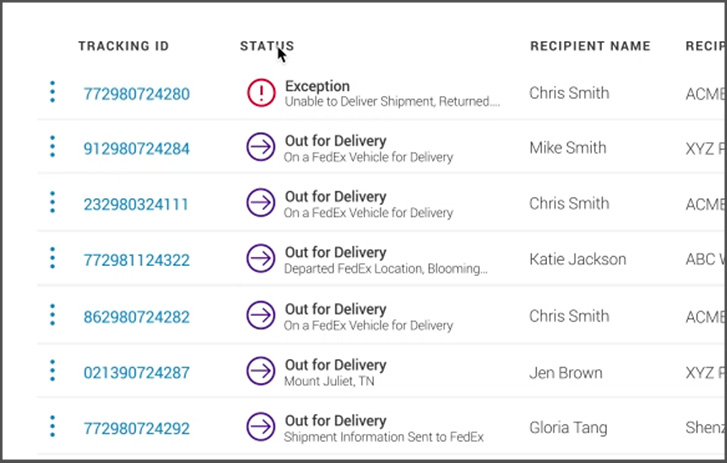
See shipment info
- Get visibility of up to 20,000 active FedEx shipments.
- Access documents, images, and detailed status-tracking information, including estimated delivery time windows.
- Access tracking information for shipments that are tied to your account and login.
- View shipments created from other related account numbers by assigning more than one account number or address to your login.
- View the nearest coordinates to where the package was marked delivered with GPS proof of delivery.
Confirm deliveries
- Get proof of delivery by viewing and downloading an image of the recipient’s signature.
- Get picture proof of delivery or delivery attempt. You’ll be confident your package arrived, or that we stopped by.
Communicate with recipients
- Alert others to a shipment’s status, delivery, and changes via email notifications.
Personalize what you see
- Customize your dashboard to filter, sort, and export reports; view shipments in list or calendar view; and nickname shipments for easy identification.
- Create a custom view and save it on your dashboard, then get the same view again with just one click.
Other ways visibility through your dashboard can help you take care of business:

Decrease costs by managing manufacturing and distribution resources more efficiently.
Improve customer service and reduce complaints by communicating any potential delays.

Recognize and resolve any problems or potential problems with your shipments quickly.
Compare tracking and visibility tools
From single-package tracking to bulk-package tracking, you’ve got options.
|
If you’re a shipper or business who wants to... |
And be able to... |
This is the ideal tracking tool for you. |
|---|---|---|
|
Access near real-time data about your shipments, all in one place. |
Use predictive insights to make proactive decisions; prioritize shipments ahead of others in the FedEx network; request intervention or have FedEx experts do it proactively, 24/7; keep customers informed about potential delays and make backup plans; and help reduce the time, money, and effort of tracking shipments. |
|
|
Manage up to 20,000 active shipments, without having to enter individual FedEx tracking or reference numbers. |
See a list of estimated delivery time windows for all of your shipments; customize views and reports; access tracking documents and images; and send notifications to recipients via email. |
|
|
Track up to 30 packages by entering individual FedEx tracking or reference numbers. |
See an estimated delivery time window. Use the tool to manage various parts of the delivery process (e.g., request a redirect, address change, or vacation hold). You can watch your package’s journey in map view, so you know when to expect it. |
|
|
Track a shipment’s status, as a recipient, throughout the delivery process. |
Get more visibility into your shipment than with standard tracking. Receive delivery notifications, request to redirect a package to a FedEx location for pickup, and more. It’s also easy to access map view. You can see your package on the move—and know if you have time to run that errand before it arrives. |
|
|
Access a flexible solution that you can connect to your current business application and configure to meet your unique supply chain needs. |
Unlock operational efficiency and improve customer satisfaction with granular, in-transit shipment insights and proof of delivery, accessible through a webhook or API integration. Our integrated solutions provide the confidence you need to navigate the complexities of shipping effortlessly with flexible pricing models and feature sets to cater to different business sizes and requirements. |




|
If you’re a shipper or business who wants to… |
And be able to... |
This is the ideal tracking tool for you |
|---|---|---|
|
Track a shipment’s status, as a recipient, throughout the delivery process. |
Get more visibility into your shipment than with standard tracking. Receive delivery notifications, request to redirect a package to a FedEx location for pickup, and more. It’s also easy to access map view. You can see your package on the move—and know if you have time to run that errand before it arrives. |
If you’re a shipper or business who wants to...
Access near real-time data about your shipments, all in one place.
And be able to...
Use predictive insights to make proactive decisions; prioritize shipments ahead of others in the FedEx network; request intervention or have FedEx experts do it proactively, 24/7; keep customers informed about potential delays and make backup plans; and help reduce the time, money, and effort of tracking shipments.
This is the ideal tracking tool for you.
If you’re a shipper or business who wants to...
Manage up to 20,000 active shipments, without having to enter individual FedEx tracking or reference numbers.
And be able to...
See a list of estimated delivery time windows for all of your shipments; customize views and reports; access tracking documents and images; and send notifications to recipients via email.
This is the ideal tracking tool for you.
If you’re a shipper or business who wants to...
Track up to 30 packages by entering individual FedEx tracking or reference numbers.
And be able to...
See an estimated delivery time window. Use the tool to manage various parts of the delivery process (e.g., request a redirect, address change, or vacation hold). You can watch your package’s journey in map view, so you know when to expect it.
This is the ideal tracking tool for you.
If you’re a shipper or business who wants to...
Track a shipment’s status, as a recipient, throughout the delivery process.
And be able to...
Get more visibility into your shipment than with standard tracking. Receive delivery notifications, request to redirect a package to a FedEx location for pickup, and more. It’s also easy to access map view. You can see your package on the move—and know if you have time to run that errand before it arrives.
This is the ideal tracking tool for you.
If you’re a shipper or business who wants to...
Access a flexible solution that you can connect to your current business application and configure to meet your unique supply chain needs.
And be able to...
Unlock operational efficiency and improve customer satisfaction with granular, in-transit shipment insights and proof of delivery, accessible through a webhook or API integration. Our integrated solutions provide the confidence you need to navigate the complexities of shipping effortlessly with flexible pricing models and feature sets to cater to different business sizes and requirements.
This is the ideal tracking tool for you.
You can also track a package by:
- Sending an email to track@fedex.com. Learn more about how to track by email.
- Please call customer support. Say “track my package,” then follow the prompts.
- Texting “follow” plus your door tag number to 48773.
- Downloading the free FedEx® Mobile app. Get notifications, alerts, and picture proof of delivery—all on your phone. You can also access FedEx Delivery Manager® features for on-the-go convenience and control.

Need more info? Go to our managing and tracking deliveries page to learn about delivery hours and service times, missed deliveries, returns, and much more.
Need more info? Go to our managing and tracking deliveries page to learn about
delivery hours and service times, missed deliveries, returns, and much more.