
FedEx® Electronic Trade Documents
Enjoy a smooth customs clearance process
Transmit your customs documentation electronically with FedEx Electronic Trade Documents.
This simple, efficient and reliable solution helps you avoid delays at customs and ensures timely delivery of your international shipments.
Why use Electronic Trade Documents?

Save time: Stop printing, folding and attaching your trade documents to each shipment. Send them with just a few clicks.
Speed up clearance: Your documents can be reviewed sooner, even before your shipment is picked up.
Save money: Save on paper, ink, and reduce your carbon footprint.
Avoid customs delays: Be notified earlier of potential errors or missing paperwork.
Choose your preferred method: Upload your own documents or create them with our shipping tool.
Personalize your documents: Add your company letterhead and digital signature.
*Note: Not all countries and territories accept Electronic Trade Documents (ETD) shipments.
When one or both of the origin or destination countries do not accept paperless clearance, your shipment will be labeled as EWO (Electronic with Originals). This means you can seamlessly upload your customs documents electronically to benefit from an early broker review but you will still have to attach printed copies of customs documents to your shipment to comply with regulatory requirements.
View the full list to see what is accepted in the countries and territories you ship to/from.
How to use FedEx® Electronic Trade Documents
Select the FedEx technology solution you use most frequently for your international shipments to view the FedEx Electronic Trade Documents setup process.

Complete the “Package Contents” section including a full description of the items and the shipment purpose.

Under “Customs Documentation”, ETD is selected by default: “Attach trade documents electronically (recommended)”.

On the “Invoice for Customs” drop down menu, select the invoice type from below option you would like to use for your shipment.
- “I will create my own invoice”, upload the file electronically.
- “I want FedEx to help me create a commercial invoice”, upload a personalized letterhead and signature (these images will be available for all future shipments).
- “I want FedEx to help me create a pro-forma invoice”, upload a personalized letterhead and signature (these images will be available for all future shipments).

If your shipment requires it, you can upload up to four additional customs documents.
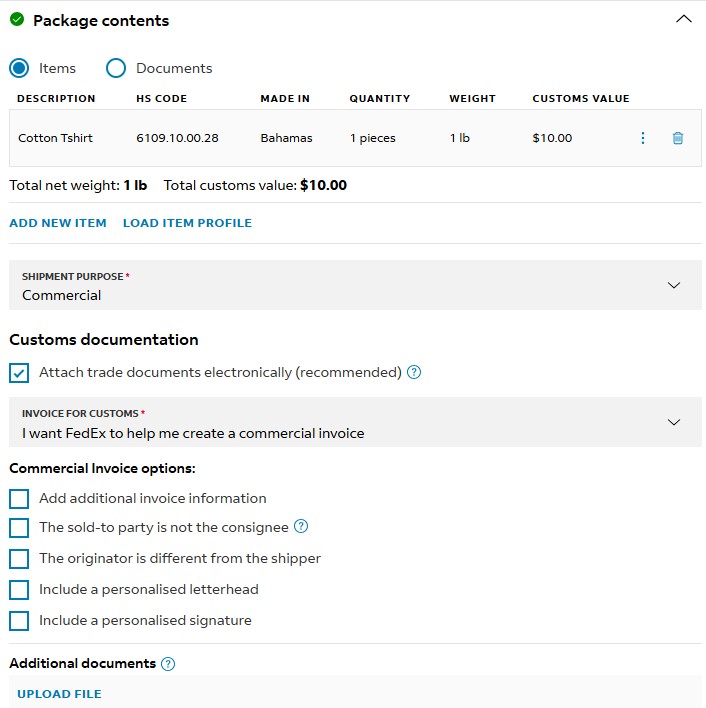
Complete the shipment information section including a full description of the items and the shipment purpose.
On Section 7: Electronically Submit Trade Documents (ETD), click the (+) button. The first time you use ETD you will be asked to approve the Terms of Use.
Select the option to upload your own customs document; click Open and then Accept.
Alternatively, use the commercial invoice generated by FedEx and click Accept to confirm.

If your shipment requires it, you can upload up to four additional customs documents.
Develop the Trade Documents Upload API. Access useful documentation on the FedEx Developer Portal. It will help you integrate Electronic Trade Documents into your shipping setup.
Contact your FedEx account executive to learn more and activate FedEx Electronic Trade Documents.
Options for uploading customs documents
Option 1: Pre-shipment
Pre-shipment document upload is available with our FedEx APIs and FedEx Ship Manager Server.
You can use the Documentation Preparation Center on FedEx® Global Trade Manager to create and save your customs documents for later use.
Option 2: At shipment
Customs documents may be uploaded by your shipping solution at the same time your label is being created. This is the most commonly used method to upload your customs documents. You can either choose to take advantage of the Commercial Invoice generated by FedEx or use your own.
Option 3: Post-shipment
Customs documents may be uploaded by your shipping solution after the label has been created. Post-Shipment Document Upload (PSDU) is ideal for shippers who create their own Commercial Invoices and do not have customs documents ready before or while the label is created.
FedEx Electronic Trade Documents is an automated international shipping solution that allows you to submit your customs documentation electronically so you no longer need to print multiple copies.
It simplifies the international shipping process – meaning you don’t have to print, fold and attach multiple copies to each shipment, which saves paper and reduces printing costs.
FedEx Electronic Trade Documents helps you simplify the international shipping process, makes operational efficiencies possible by helping you save paper, reduces your printing costs and provides peace of mind. You can:
- Upload trade documents in advance of your shipment, allowing time for pre-clearance assistance.
- Upload company letterhead and signature images to help you comply with customs clearance requirements in some countries.
- Lower your consumption of paper, printers, toner and shipping materials, and reduce your carbon footprint.
- Reduce customs delays, which increases your shipping reliability and helps improve your reputation.
- Save time when preparing documentation, enabling you to perform other departmental tasks and improve your company’s productivity and profits.
- Reduce the chances of shipment thefts, since there are no invoices on the package and commodity information isn’t revealed to third parties.
It allows you to send the customs documentation ahead of your shipment’s arrival at customs. If there is any missing or additional information needed, you’ll be notified earlier, reducing the impacts of any shipment delays or caged shipments.
Not all countries and territories accept Electronic Trade Documents (ETD) shipments.
When one or both of the origin or destination countries do not accept paperless clearance, your shipment will be labeled as EWO (Electronics with Originals). This means you can seamlessly send your trade documents electronically to benefit from an early broker review but you will still have to attach printed copies of trade documents to your shipment to comply with regulatory requirements.
View the full list to see what is accepted in the countries and territories you ship to/from.
-
‘ETD’ will display on the shipping label when the shipment is going to a country that fully supports Electronic Trade Documents.

- ‘EWO’ will display on the shipping label when the documents have been submitted electronically but a paper copy of your customs document will still be required to be printed and placed in the pouch.

FedEx Electronic Trade Documents can be used for both imports and exports. Although ETD is especially advantageous for commodity shipments, it can also help you save ink and paper when sending documents.
When shipping documents using FedEx Ship Manager at fedex.com: after you complete the ‘Package contents’ section; simply choose ‘I will not attach an invoice’ from the ‘How would you like to complete your commercial invoice’ dropdown and fill out the rest of the form as usual. FedEx Electronic Trade Documents is selected by default in the ‘Customs documentation’ section.
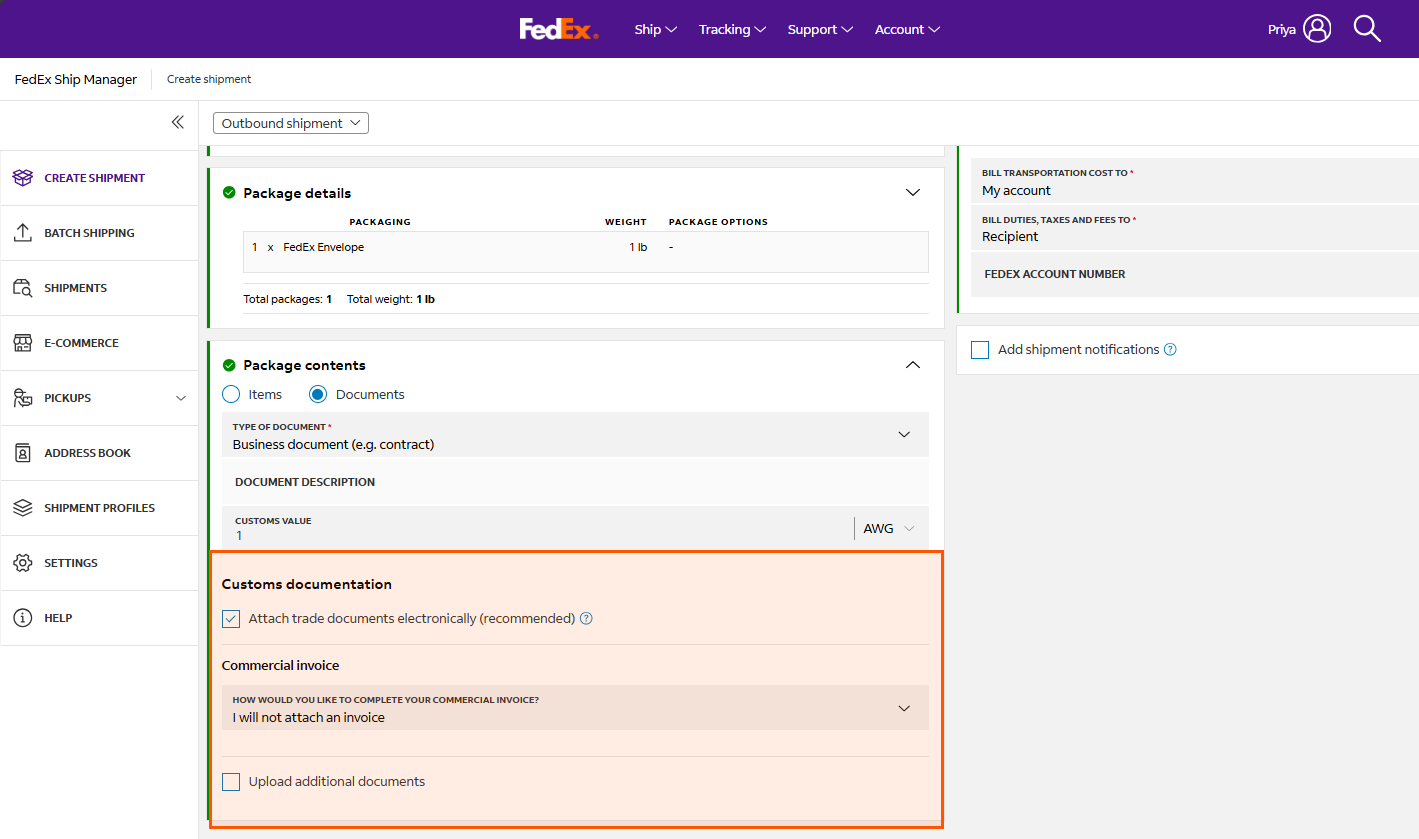
You can choose to either electronically submit your own trade documents or take advantage of documents generated by FedEx.
Depending on the shipment destination and/or origin country, you might be required to submit printed paperwork.
View the full list to see what is accepted in the countries and territories you ship to/from.
Yes. FedEx Electronic Trade Documents allows you to submit customs documentation electronically, but you must still print a shipping label.
FedEx Ship Manager at fedex.com and FedEx Ship Manager Software:
- Letterhead images should be no larger than 700 pixels wide by 50 pixels high.
- Signature images should be no larger than 240 pixels wide by 25 pixels high.
FedEx Ship Manager Server:
- Letterhead images should be no larger than 720 pixels wide by 154 pixels high.
- Signature images should be no larger than 336 pixels wide by 48 pixels high.
You can submit electronically:
- Up to 5 documents per shipment
- Up to 5MB in size per document
- Accepted formats: .doc, .docx, .xls, .xlsx, .txt, .rtf, .jpg, .gif, .bmp, .tif, .png or .pdf
- File names should be less than 244 characters