
How to use FedEx® Electronic Trade Documents
Learn how to activate and submit customs documents with ETD.
FedEx Ship Manager™ at fedex.com
Activate ETD
Follow these simple steps:
- Log in to your account.
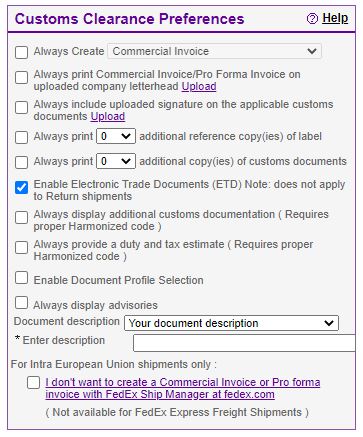
- Click Preferences above ‘Billing Details’ section and under ‘Contact your administrator’.
- Within the ‘Customs Clearance Preference’ section, tick the Enable Electronic Trade Documents (ETD) box and agree to the terms and conditions.
- Upload a letterhead and signature file. Adjust letterhead within 700 pixels wide by 50 pixels tall and adjust signature within 240 pixels wide by 25 pixels tall before upload – you’ll need them for most customs documents.
- Click Save changes.
Create an ETD shipment

At-Shipment
The most common way to submit your customs documentation is when creating your shipping label on FedEx Ship Manager at fedex.com. You can either choose to take advantage of the commercial invoice generated by FedEx or decide to upload your own commercial invoice in your preferred format.
Pre-shipment
You can use Global Trade Manager's Document Preparation Center to create your shipping documents and save them for later use. Once you are ready to ship:
- Download the documents from the Document Preparation Center to your PC.
- When creating the shipment in FedEx Ship Manager at fedex.com, upload the documentation saved to your PC from Global Trade Manager.
To learn more on how to create an ETD shipment on FedEx Ship Manager at fedex.com, check our job aid.
The new version of FedEx Ship Manager™ at fedex.com
Create an ETD shipment
At-shipment
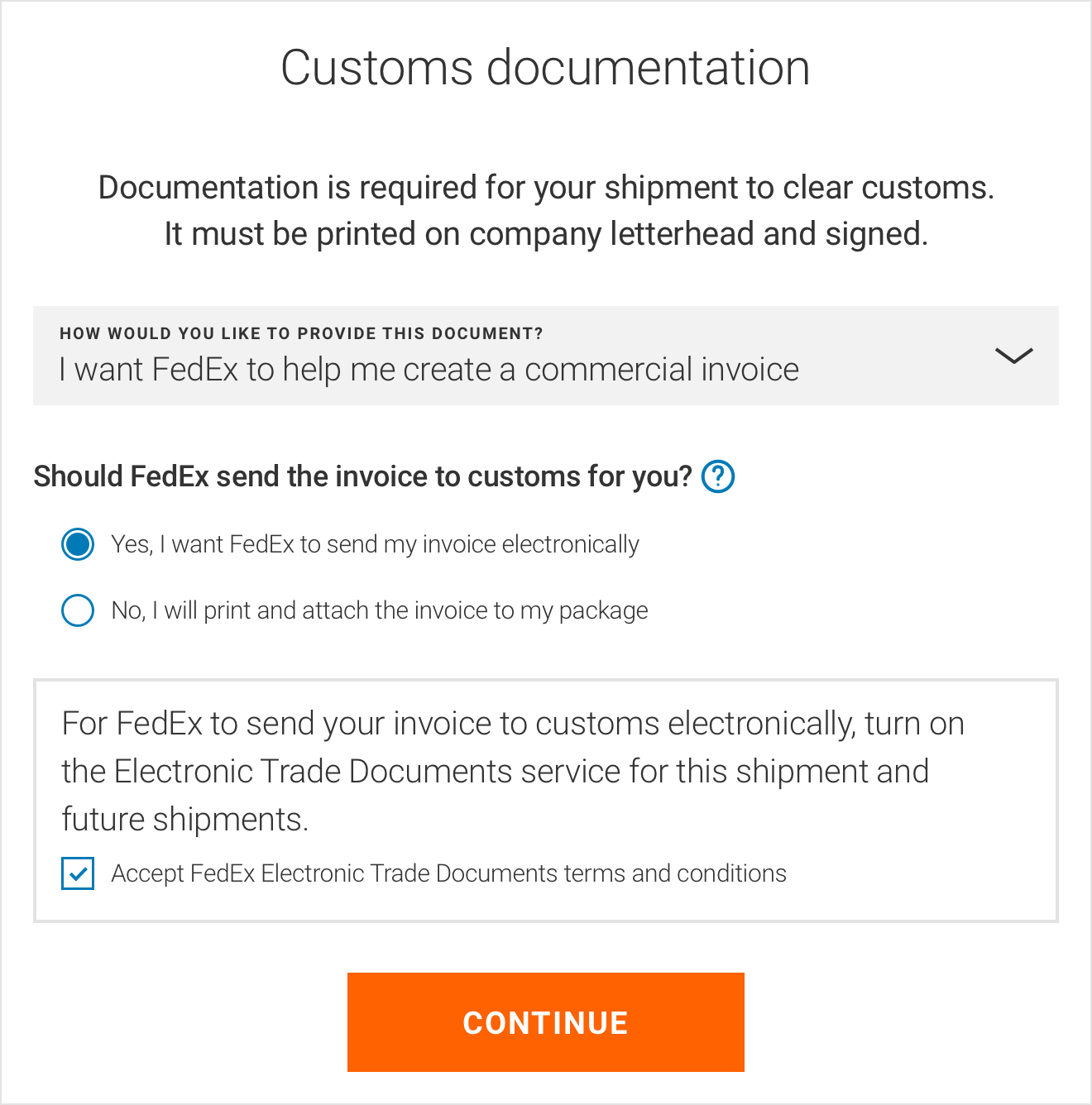
You can submit your customs documents while creating the shipping label. You can either choose to take advantage of the commercial or pro forma invoice generated by FedEx or decide to upload your own commercial invoice. If you choose the option I want FedEx to help me create a commercial invoice or I want FedEx to help me create a pro forma invoice, upload your signature and letterhead.
When using ETD for the very first time, you will be asked to ‘Accept FedEx Electronic Trade Documents terms and conditions’.
Other Shipping Solutions
Activate ETD
FedEx Ship Manager® Software
ETD is activated by default from version 13 onwards. For older versions or integrated software, please contact your FedEx representative.
FedEx Web Services
Search for Electronic Trade Documents in the Developer Resource Center. For assistance, contact your FedEx representative.
FedEx Server
Contact your Account Executive to learn more and activate FedEx Electronic Trade Documents.
Create an ETD shipment
In all above shipping tools, you can either upload your customs documents at the same time you create your shipping label or after your shipping label has been created (via Post-Shipment Document Upload). If you prefer to use a FedEx-generated commercial invoice, the required commercial invoice needs to be uploaded at the time of label creation but additional documents can be uploaded at a later stage.

Discover Post-Shipment Document Upload (PSDU)
- It’s ideal for customers who create their own commercial invoices and have third-parties or remote offices creating customs documentation.
- It allows the shipping department to focus on getting the shipments packed and ready for pickup.
- It’s available upon activation by our Customer Technology team.
How to submit customs documentation with PSDU
Reach out to your sales representative for details on how to enable ETD PSDU on your shipping software.
Customers using FedEx Global Ship Manager, FedEx API, and FedEx Ship Manager Server can upload customs documentation after the label has been printed.
Customs documentation must be submitted on the same business day and within cutoff times of the shipper’s location.
PSDU is not supported on FedEx Ship Manager at fedex.com.