
Welcome to FedEx® Reporting
See what's in store for freight
FedEx Freight will be spinning off as an independent freight company effective June 1, 2026. You can still count on Federal Express Canada Corporation for the fast, reliable air freight services you've come to expect. Find out more about the spin-off and how it could benefit your business.
Better, faster, and easier reporting
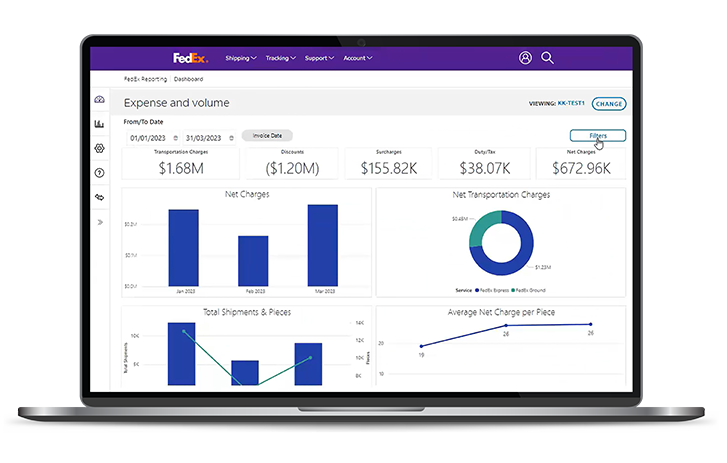
FedEx Reporting provides you with access to near real-time critical shipment data at your fingertips. View your dashboard for an at-a-glance summary of your shipment trends and charges, run detailed reports more quickly and easily, set your preferences and use filters to personalize your experience.
How FedEx Reporting helps you
With this powerful tool, you can easily view shipping details, run reports in no time, and make informed decisions to optimize your shipping spend. It’s time to take control and maximize your efficiency with FedEx Reporting.
What can you do now?
Your FedEx Reporting tool provides simplified, streamlined access to the information you need. You’ll be able to view shipping details, run reports more quickly and easily, and make better-informed business decisions to optimize your shipping spend.

Dashboard
- Get an at-a-glance summary of your shipment trends and charges, without having to run a report.
- Drill down into the details to view more granular shipping and billing data.

Personalization
- Use filters to customize the information you see and how it appears.
- Set preferences for weight, dimensions, currency, notification settings, roles (shipper or payor), and more.

Recurring reports
- Schedule reports to run automatically on the days you specify.
- Receive notifications when reports are ready to view or download.
What’s coming next?

In the coming months, you’ll be able to:
- Access additional reports and dashboards.
- Use API integration to pull data into your own systems for analysis.
How to sign up
Choose the option that matches your current FedEx account setup.
New to FedEx Reporting?

If you have a FedEx shipping account, but don’t have a fedex.ca User ID

If you already have a FedEx shipping account and a User ID.
After your first login:
- Set your preferences, then click Save and Continue.
- Choose your FedEx account numbers from the available list, then click Save and Finish.
- Explore the dashboard.
Already using FedEx Reporting?

If you were already using FedEx Reporting, you can log in directly.
See FedEx Reporting Terms & Conditions.
Frequently asked questions
FedEx Reporting is a user-friendly web application that provides access to your invoiced shipping data on a convenient dashboard. With it, you’ll be able to:
- Request, view, and download comprehensive reports on your business activity with FedEx, and track the status of report requests easily.
- Schedule weekly and/or monthly reports to fit your needs.
- Invite other registered users to run reports on your accounts if you have administrative access.
Please note that all data in FedEx Reporting is for invoiced shipments only.
It includes all FedEx Express and FedEx Ground data for invoiced shipments.
We’ll be adding reports and other features periodically.
The FedEx Reporting dashboard now provides a streamlined overview of your data in the ‘Expense and Volume' and section. It also allows you to drill down to view more detailed information.
The FedEx Reporting tool offers the ‘Shipment Detail’ report for FedEx Express and FedEx Ground. Additional reports will be added periodically.
You can request up to 24 months of historical data on your dashboard and in your reports.
Here’s how to create new groups to run your reports:
- Go to the settings icon from your dashboard
- Select ‘Manage accounts and groups’
- Click on ‘Groups’
- Click on ‘Create Group’
The following reports are currently available:
- Parcel Shipment (Detail/Custom)
- Parcel Claim Activity (Detail/Custom)
- Parcel Surcharge (Detail/Summary)
- Parcel Shipper Summary (Summary)
- Parcel Account Master (Detail)
- Parcel Address Correction (Detail)
- Parcel Dimmed Package (Detail)
- Parcel Day in Transit (Summary)
- Parcel Expense & Volume (Summary)
Features:
- Create, delete and edit account groups
- Generate a dashboard based on account groups to run associated 'Parcel’ reports
These reports and features offer a variety of detailed shipment and billing information to help you better understand and manage your shipping activities.
Yes, there are alternative ways to get the same level of detail. Here’s how:
- The ‘Custom Parcel Claims’ is available via the ‘Parcel Claims’ report.
- The ‘Shipper Summary’ is available via the ‘Shipment Detail Report’ or a ‘Custom Shipment Detail’ report.
No, this report has been discontinued and is no longer available. We continuously evaluate our reporting offerings to ensure we are providing the most relevant and valuable information to our customers. After careful consideration, we decided to discontinue it.
If you are not already registered for FedEx Reporting, then you’ll need to create a fedex.ca user ID and password.
If you are experiencing issues with the FedEx Reporting tool, you may be able to resolve the problem by clearing your cache and cookies. If the issue persists, contact FedEx Technical Support at 1.877.339.2774. When you call, please have your nine-digit FedEx account number and fedex.ca user ID ready for assistance.
If you have questions about a specific invoice or billing-related data, please contact your FedEx account executive.
At FedEx, we take the protection of your account information seriously. To safeguard your data, we use highly secure encryption protocols that help ensure a high level of security. For more details on our approach to privacy and security, please refer to the FedEx Privacy Code.